Front-end vs Back-end Development - Which Should You Choose in 2026?
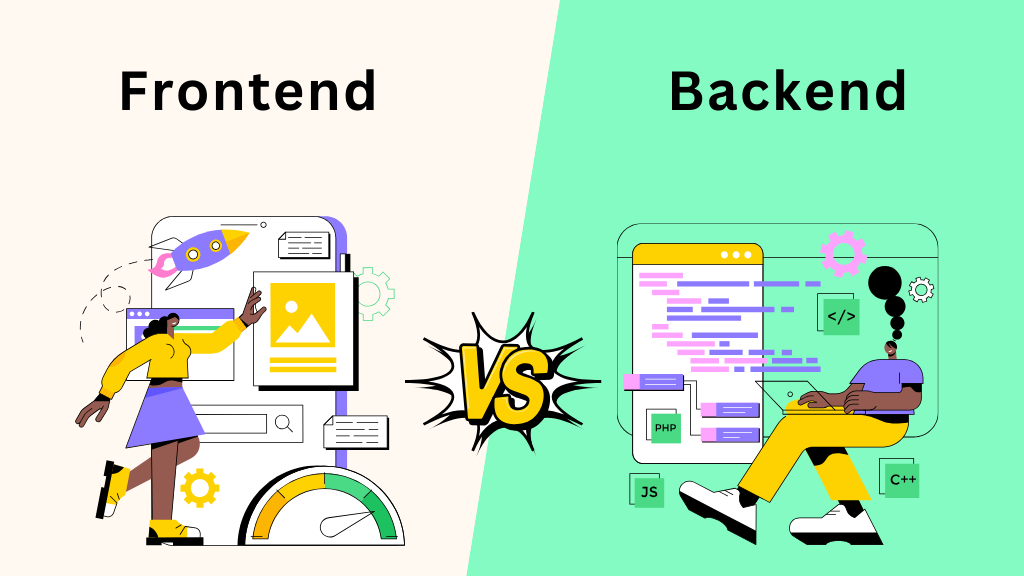
You want to learn programming. You’ve told a few people and they immediately said something like “oh, you should do front-end” or “back-end is where the real money is.” And now you’re standing here wondering: what does any of that actually mean?
These two terms get thrown around constantly in tech circles, almost always without any explanation attached. If you already know what they mean, skip to the section that interests you. But if you’re starting from zero, this post is going to fix that.
We’re going to cover what front-end development is, what back-end development is, how they work together, what each one actually looks like as a career, and then hand the decision back to you with a checklist that’ll tell you more than you’d expect.
Let’s get into it.
What Is Front-end Development?
The Simple Version
Front-end development is everything you can see and interact with on a website or web application. Every button you’ve clicked, every form you’ve filled out, every animation you’ve watched play across your screen - that’s front-end.
The front-end developer’s job is to build the user interface (UI) - the part of the application that sits directly in front of the user and responds to what they do.
When you type something into a search bar and suggestions start appearing, a front-end developer built that. When you click “Add to Cart” and the cart icon updates without the entire page reloading, a front-end developer built that. When a website looks completely different on your phone than on your laptop and still works perfectly on both, a front-end dev - I’m sure you’re catching my drift at this point. Basically, if you can poke it with your finger or cursor, a front-end developer put it there.
What Front-end Development Does NOT Do
This is important and often misunderstood.
Front-end development does not handle:
- Storing your data - your username, your order history, your profile picture - none of that lives on the front-end
- Business logic - the rules that decide what you can and can’t do on a platform (like whether you have enough balance to complete a purchase)
- Authentication - verifying that you are who you say you are
- Database queries - looking up information and returning it
When you log into an account and it says “Welcome back, Ahmad,” the front-end displayed that message - but it was the back-end that checked your credentials, found your name in the database, and sent it back. The front-end just put it on the screen. Think of it as the front-end being the face and the back-end being the brain - one without the other and you’ve got either a very pretty vegetable or a very smart brick wall.
How Front-end Development Does What It Does
Three technologies sit at the foundation of every front-end in existence:
| Technology | What It Does | Real-world Analogy |
|---|---|---|
| HTML | Defines the structure and content of the page | The skeleton - gives everything its shape and place |
| CSS | Controls the visual appearance | The skin and clothes - colour, size, spacing, fonts |
| JavaScript | Adds interactivity and dynamic behaviour | The muscles - makes things actually move and respond |
Every website you’ve ever visited was built on top of these three. They’re not optional - they’re the baseline. After that, front-end developers typically learn frameworks and libraries that sit on top of JavaScript to make building complex UIs faster and more manageable.
The most common ones you’ll encounter:
- React - developed by Meta, the most widely used in industry
- Vue.js - lighter and often considered more beginner-friendly
- Angular - developed by Google, popular in enterprise settings
- Svelte - newer, gaining traction for its performance approach
Front-end developers also work closely with design tools like Figma to translate visual mockups into working interfaces, and they care deeply about things like responsiveness (does this work on mobile?), accessibility (can everyone use this?), and performance (does this load fast?).
What a Front-end Developer Actually Does Day to Day
On any given day, a front-end developer might:
- Convert a Figma design into a working web page
- Fix a layout that breaks on certain screen sizes
- Add animations or transitions to improve the user experience
- Connect a form to an API and handle the response
- Debug why a button isn’t doing what it’s supposed to
- Review someone else’s UI code and suggest improvements
It’s a role that sits at the intersection of design and engineering. You don’t need to be a graphic designer, but you need to have an eye for detail, care about how things look and feel, and be comfortable thinking about the user’s experience at all times.
Ready to go deeper into front-end? The front-end development guide covers everything from how HTML, CSS, and JavaScript work together to a full roadmap for getting job-ready.
What Is Back-end Development?
The Simple Version
Back-end development is everything that happens behind the scenes - the part of a web application the user never directly sees, but couldn’t function without.
When you log into Instagram, something has to:
- Check that your password is correct
- Retrieve your feed from a database of millions of posts
- Figure out which posts to show you based on who you follow
- Send all of that data to your phone in the right format
None of that happens on your screen. It all happens on a server. It’s the engine room of the ship - passengers don’t see it (unless they go snooping around), but the moment it stops, everyone notices.
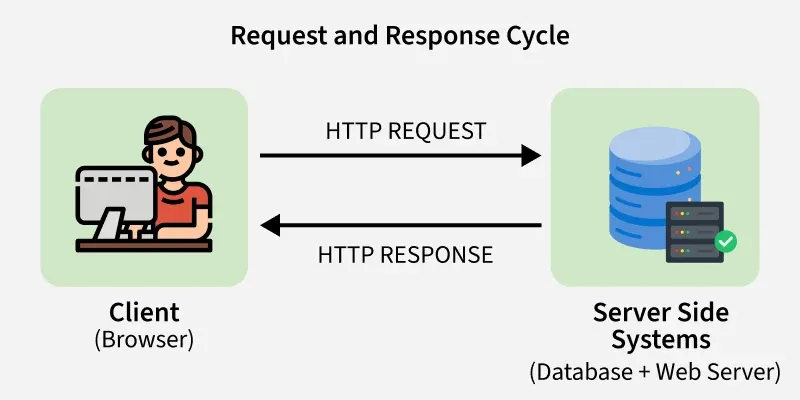
For those who don’t know or have forgotten: A server is a computer somewhere in the world running code that processes requests, applies logic, queries databases, and sends responses back. That code is back-end development.
What Back-end Development Does NOT Do
Back-end development does not handle:
- What the user sees: the back-end has no concept of colours, layouts, animations, or fonts
- User interactions: clicks, hovers, scroll events - none of that touches the back-end directly
- Rendering pages: in most modern web apps, the back-end sends data and the front-end handles the rendering (though there are exceptions)
The back-end doesn’t know or care whether a button is red or blue. It only knows: a request came in, here’s the data you asked for, here’s what happened, request complete.
How Back-end Development Does What It Does
Back-end development revolves around three core concepts.
-
Servers: A server is a program (running on a computer, somewhere) that listens for incoming requests and responds to them. When you open a browser and type in a URL, you’re sending a request to a server. The server processes it and sends something back.
-
Databases: This is where data is stored persistently. Your account information, your posts, your transaction history - all of that lives in a database. Back-end developers write code to create, read, update, and delete data (known as CRUD operations). The two main flavours:
| Type | Examples | Best For | Scalability |
|---|---|---|---|
| Relational (SQL) | PostgreSQL, MySQL, SQLite | Structured data with clear relationships | Scales upward - it scales vertically by adding more storage (sometimes CPU and RAM) into a single server |
| Non-relational (NoSQL) | MongoDB, Firebase, Redis | Flexible, unstructured, or high-volume data | Scales outward - it scales horizontally by distributing data across multiple server nodes in a cluster. |
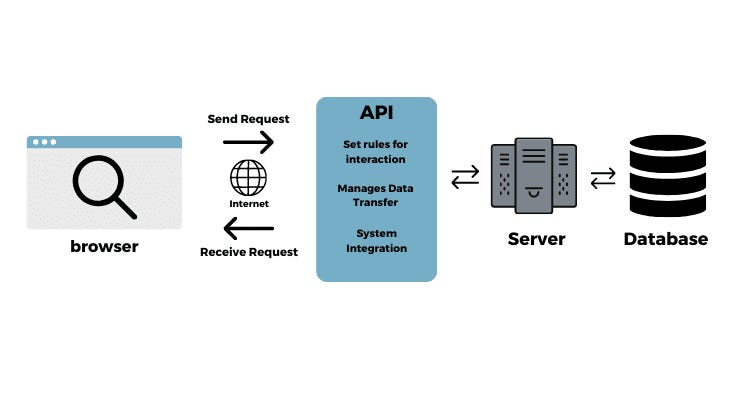
- APIs (Application Programming Interfaces): APIs are how the back-end and front-end communicate. The back-end exposes a set of endpoints (think of them as doors) that the front-end can knock on to request or send data. The front-end says “give me this user’s profile,” the API receives that request, pulls the data from the database, and sends it back in a structured format - usually JSON.
💡 Quick Note: JSON - JavaScript Object Notation - is a lightweight data interchange format that is widely used in back-end development. It’s a simple, text-based format for exchanging data between servers, web applications, and mobile apps. You’ll be working with it a lot (and I mean A LOT) when you get settled in with back-end development.
What a Back-end Developer Actually Does Day to Day
On any given day, a back-end developer might:
- Write/Update API endpoints to support new features
- Optimize a database query that’s running too slowly
- Set up authentication so users can log in securely
- Write business logic - the rules that govern how data is created, modified, or deleted
- Debug a server error that’s causing requests to fail
- Deploy code to a server and monitor it in production
It’s a role that rewards logical thinking, comfort with abstraction, and an interest in how systems are designed and connected. You don’t need to care about what anything looks like - you need to care that everything works, scales, and stays secure.
Ready to go deeper into back-end? The back-end development guide covers the full roadmap from Java fundamentals to building production-ready APIs.
How They Work Together
Here’s where it all clicks.
Think about hardware and software. Your laptop’s processor, RAM, and storage are raw capability - they can do extraordinary things. But if you switch your laptop on with no operating system, no programs, nothing installed, it just sits there. It can’t do anything useful on its own. Add software, and suddenly that hardware can run a browser, stream music, process a spreadsheet. The software gives the hardware purpose.
Flip it around: software without hardware is equally useless. A program with no machine to run on is just instructions floating in the void.
Front-end and back-end have exactly the same relationship.
A front-end without a back-end is a beautiful but hollow interface. You can see the buttons, you can click them - but nothing actually happens. There’s no data, no logic, no persistence. It’s hardware with no software.
A back-end without a front-end is a powerful engine with no controls. The logic runs, the database stores things, the API responds to requests - but there’s no interface for any human to actually interact with. It’s software running on hardware locked in a box with no screen, no keyboard, no way in.
They’re not competing - they’re complementary. Every web application you’ve ever used was built by both working in concert, sending requests and responses back and forth, each handling exactly the part the other can’t.
The Tools and Technologies
Here’s a practical look at what each world actually uses.
Front-end Tools
| Category | Tools / Technologies |
|---|---|
| Core languages | HTML, CSS, JavaScript |
| Frameworks & libraries | React, Vue.js, Angular, Svelte |
| Styling | Tailwind CSS, Bootstrap, Sass |
| Design tools | Figma, Adobe XD |
| Package managers | npm, Yarn |
| Testing | Jest, Cypress |
| Build tools | Vite, Webpack |
Back-end Tools
| Category | Tools / Technologies |
|---|---|
| Languages | Java, Python, JavaScript (Node.js), Go, Ruby, PHP |
| Frameworks | Spring Boot, Django, FastAPI, Express.js, Laravel |
| Databases | PostgreSQL, MySQL, MongoDB, Redis |
| API standards | REST, GraphQL |
| Authentication | JWT, OAuth 2.0 |
| Servers & hosting | Nginx, Apache, AWS, DigitalOcean, Heroku |
| Version control | Git, GitHub |
What They Share
Both front-end and back-end developers use:
- Git: For version control, tracking changes, collaborating on code, and rolling back when things break (which is kinda inevitable)
- The terminal: Yes, even front-end developers (sorry, not sorry). If you haven’t gotten there yet, our Bash scripting post is worth your time to look into
- APIs: Front-end consumes them, back-end builds them, but both sides need to understand how they work
Jobs, Salaries & Demand in 2026
Front-end Development
Job market: Front-end is one of the most common entry points into the tech industry, which means both high demand and high competition. Companies of all sizes need front-end developers - from startups building their first product to large enterprises maintaining complex web applications.
In-demand skills in 2026:
- React (still dominant)
- TypeScript (JavaScript with types - increasingly expected, not just a bonus)
- Accessibility (WCAG compliance is being regulated in more markets)
- Performance optimisation and Core Web Vitals
Salary ranges (approximate, 2026):
| Level | Nigeria (NGN/year) | Global Remote (USD/year) |
|---|---|---|
| Junior | ₦1.5M – ₦3M | $35,000 – $60,000 |
| Mid-level | ₦3M – ₦7M | $60,000 – $100,000 |
| Senior | ₦7M – ₦15M+ | $100,000 – $160,000+ |
DISCLAIMER: Remote roles with international clients or companies tend to pay significantly more than local market rates. These figures are directional, while actual pay varies by company size, industry, and your specific skills.
Career paths from front-end: UI/UX Engineering, Front-end Architecture, React Native (mobile development), Design Systems Engineering.
Back-end Development
Job market: Back-end developers are consistently in high demand - especially those with cloud experience, API design skills, and knowledge of scalable systems. The barrier to seeing your work is higher (nothing is visual), but the ceiling on compensation is generally higher as well.
In-demand skills in 2026:
- Python (still dominant for back-end, and increasingly tied to AI tooling)
- Node.js / TypeScript on the server side
- Cloud platforms (AWS, GCP, Azure)
- DevOps basics: containers, CI/CD pipelines
- API security and authentication
Salary ranges (approximate, 2026):
| Level | Nigeria (NGN/year) | Global Remote (USD/year) |
|---|---|---|
| Junior | ₦2M – ₦4M | $40,000 – $70,000 |
| Mid-level | ₦4M – ₦9M | $70,000 – $120,000 |
| Senior | ₦9M – ₦20M+ | $120,000 – $200,000+ |
Same caveat applies - treat these as a directional reference, not a guarantee.
Career paths from back-end: API Engineering, Cloud Engineering, DevOps, Site Reliability Engineering (SRE), Data Engineering, Backend Architecture.
Here’s Where I Landed
I want to be straightforward with you: I’m currently inclined toward back-end development. Not because I think it’s better - both are legitimate, both pay well, and both are in demand. But because of two honest things I know about myself.
The first is that I genuinely enjoy the behind-the-scenes logic. The part where a request comes in and something has to decide what to do with it - what rules apply, what data to fetch, what response to send back - that’s the part that interests me. There’s something satisfying about a system that works even when nobody is looking at it.
The second is that front-end development requires a real eye for visual detail such as spacing, colour, layout, responsiveness - and that’s not where my instincts naturally sit. I can appreciate a well-designed interface, but building one from scratch isn’t where I feel at home. I’d be the person who ships a login form that works perfectly and looks like it belongs in 2003.
Your reasons for choosing will be different from mine, and that’s exactly the point. This decision should come from what you enjoy and where your instincts land. Which is what the next section is for.
So, Which Side Are You On?
Ten questions. For each one, tick the side that resonates with you - you can tick both if you genuinely feel pulled in both directions. Be honest with yourself. This isn’t a test - there are no wrong answers, just a more enlightened you at the end of it.
At the end, hit the button to see your result.
| Question | 🖥️ Front-end | ⚙️ Back-end |
|---|---|---|
| When you use an app, are you more interested in how it looks and feels, or how it works under the hood? | ||
| Does tweaking colours, fonts, and spacing until something looks just right sound satisfying to you? | ||
| When something breaks on a website, is your first instinct to wonder about the visual layout, or the data flow behind it? | ||
| Does the idea of building a component that works perfectly across every screen size excite you? | ||
| Does the idea of designing a system that handles millions of requests without breaking excite you? | ||
| Are you more drawn to visual tools - design apps, UI kits or logical tools - terminals, scripts, databases? | ||
| Would you rather spend your day making something beautiful, or making something bulletproof? | ||
| When you imagine writing code, do you picture building something a user clicks on, or something a user never sees? | ||
| Does working with data - storing it, retrieving it, organising it - interest you more than presenting it? | ||
| If you had to describe your ideal project, would it involve more pixels or more logic? |
There’s Always More to Learn
If you’ve made it this far, you now know what front-end and back-end development actually are, how they work together, and if you tried the checklist - you’ve got a clearer sense of where you’re leaning.
Whatever side you’re on, the next step is the same: start building things. Read about the tools, follow tutorials, and get something running. The answer to “which should I choose?” gets a little less vague and a lot clearer once you’ve actually written some code. Turns out the best way to know if you like something is to actually try it. Revolutionary, I know.
If you’ve landed on front-end, the front-end development guide is your next stop — HTML, CSS, JavaScript, and a full roadmap to React. If you’ve landed on back-end, the back-end development guide covers everything from Java fundamentals to building real APIs. If you’ve gone for both option, the full-stack development guide is definitely where you need to go next. If you’re not fully set up on Linux yet, the Windows to Linux post covers the full setup. And if you haven’t touched the terminal yet, the Bash scripting post is a solid next stop - both front-end and back-end developers live in the terminal more than you’d think.
As always, if you’ve got questions or want to talk through the decision, the community is open — links in the footer.