Is Network Engineering Still Worth It in 2026? (Full Career Breakdown & Roadmap)
If you’ve read the cybersecurity post or the ethical hacking post, you’ve already run into networking fundamentals without necessarily thinking about them as their own discipline. Every roadmap on this blog starts with the OSI model, TCP/IP, DNS, and how packets actually move - because none of the rest works without it. This post is about the field that owns that layer professionally.
“Is networking still worth it?” is a question that gets asked constantly, usually followed by some version of “isn’t everything cloud now?” It’s a fair question, and it deserves a straight answer instead of the usual hedge found everywhere else.
This post covers what network engineering actually is in 2026, an honest look at what’s changed and what hasn’t, a clear verdict on whether it’s worth pursuing, a complete roadmap, a lightweight home lab you can build with zero hardware, and the certifications that genuinely move the needle.
Let’s get into it.
What is Network Engineering?
Network engineering is the discipline of designing, building, securing, and maintaining the infrastructure that lets computers talk to each other - from a two-router office setup to the backbone that a global company routes millions of requests through every second.
If back-end development is about what happens on a server, network engineering is about how that server’s response actually reaches you. Every API call, every website load, every video stream travels across infrastructure that a network engineer designed, configured, and keeps running. It’s invisible when it works and impossible to ignore when it doesn’t.
The field breaks down into a few core areas, and understanding all of them - even before specialising in one - is where the roadmap later in this post starts.
Routing & Switching
The traditional core of network engineering. Switching handles how devices communicate within a local network - which switch port a device is on, how VLANs segment traffic, how switches learn and forward frames. Routing handles how traffic moves between networks - how a router decides the best path to send a packet, how routing protocols like OSPF and BGP exchange that information automatically across large networks.
This is the foundation everything else in networking sits on, and it’s still the first thing every network engineering job expects you to know cold.
Cloud Networking
Networking didn’t disappear when workloads moved to the cloud - it also moved with them. Virtual Private Clouds (VPCs), subnets, route tables, security groups, and load balancers in AWS, Azure, and GCP are the same networking concepts you’d apply to physical hardware, expressed as configuration instead of cables.
A cloud engineer who doesn’t understand routing and switching is the same as a web developer who doesn’t know what an anchor tag is - the tools might look sophisticated, but the thing everything else depends on was never actually learned.
This is also the single biggest shift in the field over the last several years, and it’s central to where this post’s verdict lands.
Software-Defined Networking (SDN)
SDN separates the control plane (the decision-making logic of a network) from the data plane (the hardware that actually moves traffic), managed centrally through software instead of configuring individual devices one by one. SD-WAN - its most widely deployed commercial form - lets companies manage geographically distributed networks through a single dashboard instead of touching every branch router by hand.
SDN is the clearest example of automation reshaping how the job is done without eliminating the need for someone who understands what’s being automated.
Network Security
Firewalls, VPNs, intrusion detection and prevention systems, network segmentation, zero trust architecture. Security has moved from being a bolt-on to being baked into how networks are designed from the start - which means the line between “network engineer” and “network security engineer” has been getting thinner every year.
Wireless Networking
Wi-Fi design, RF (radio frequency) planning, enterprise wireless deployment, and increasingly, private 5G for enterprise campuses. A smaller specialisation than the others, but a genuinely lucrative one for engineers who go deep on it - most companies underestimate how hard good wireless design actually is until they’ve lived with bad wireless design.
The recommendation: build routing and switching fundamentals first.
Every other area on this list assumes you already understand how traffic actually moves. Skipping ahead to cloud networking without solid routing fundamentals is the single most common reason people stall out in this field, and it comes up again in the Common Mistakes section later in this post.
The Honest Analysis
Here’s what nobody arguing either side of the “networking is dead / networking is fine” debate wants to say clearly: both sides are half right.
What’s Changed
Cloud adoption changed where the work happens, not whether it’s needed. Companies aren’t racking physical switches in their own server rooms the way they were a decade ago. A huge amount of networking now happens inside AWS, Azure, and GCP as virtual infrastructure rather than physical hardware. If your mental image of a network engineer is someone crawling under a desk to punch down a cable, that image is increasingly out of date.
Automation changed how configuration gets done. Manually SSH-ing into forty routers to push the same configuration change is being replaced by tools like Ansible, Terraform, and vendor-specific automation platforms that push configuration across an entire fleet of devices at once. This is a genuine shift - the network engineers who ignore it are making themselves obsolete faster than the field is.
SD-WAN changed how distributed networks get managed. Centralised, software-driven management of geographically spread infrastructure has replaced a huge amount of manual, branch-by-branch configuration work, especially for companies with many physical locations.
AI is starting to touch network operations. AIOps platforms that predict failures, auto-remediate common issues, and flag anomalous traffic patterns are becoming standard in larger environments. This doesn’t replace the engineer - it changes what and how the engineer spends their time, shifting effort away from routine troubleshooting and toward design, architecture, and handling the genuinely hard problems the automation can’t.
What Hasn’t Changed
Someone still has to design the network. Cloud VPCs don’t configure their own subnets and route tables. SD-WAN dashboards don’t decide the underlying topology. Automation scripts don’t write themselves. Every “the cloud replaced networking” argument quietly assumes the network engineering work vanished, when what actually happened is it moved into a different interface.
Physical infrastructure still exists, and someone still runs it. Data centres, ISPs, enterprise campuses, hospitals, and manufacturing floors all run on physical network infrastructure that isn’t going anywhere. Cloud providers themselves employ enormous numbers of network engineers to build and run the physical infrastructure that the cloud sits on top of.
Networks are more critical to security than ever. As attacks increasingly target infrastructure and lateral movement across networks, understanding how traffic actually flows has become inseparable from cybersecurity work. This is precisely why the cybersecurity and ethical hacking posts on this blog both start with networking fundamentals - you cannot secure, or attack, what you don’t understand at the network level.
The fundamentals don’t expire. TCP/IP, subnetting, routing logic, and the OSI model have been stable for decades and show no signs of being replaced. Tools and interfaces change constantly. The underlying concepts they’re built on don’t.
The Verdict
Yes - network engineering is still worth pursuing in 2026. But with one condition that matters more than anything else in this post.
Never stop at being a general network engineer.
Treat traditional routing and switching as the foundation of network engineering, not the destination. The engineers who are struggling right now are the ones who learned Cisco IOS a decade ago, never touched cloud networking, never picked up automation, and are now watching job postings ask for skills they never built. The engineers who are thriving are the ones who took that same foundation and pushed it toward cloud networking, automation, and network security - because that’s where the value, and the compensation, has migrated.
This isn’t a unique observation to networking. It’s the same pattern this blog has covered before: back-end developers who learn the fundamentals the hard way before reaching for frameworks that abstract them away. Learn the hard thing first, so the easy things - and the higher-paying specialisations built on top of them - make sense later.
The field will never revert to how it looked five years ago, and pretending otherwise is how careers stall. Build the foundation. Then build past it.
Jobs, Salaries & Demand in 2026
The Job Market
Network engineering roles remain consistently in demand - not with the explosive growth headlines that cybersecurity or AI roles get, but with a stability that comes from being genuinely load-bearing infrastructure work. Every company with more than a handful of employees needs someone who understands how their network functions, whether that’s an in-house hire or a managed service provider.
The shift in the job market isn’t demand disappearing - it’s in what “network engineer” is expected to mean. Job postings increasingly blend traditional networking requirements with cloud platform experience, automation skills, and security awareness. A candidate who can only speak to physical routing and switching is competing for an increasingly shrinking slice of the market. A candidate who can speak to routing and switching, cloud networking, and automation is competing for a growing one.
In-demand skills in 2026:
- Routing and switching fundamentals (still the baseline every employer expects)
- Cloud networking (AWS VPCs, Azure Virtual Networks, GCP VPC - at least one, ideally two)
- Network automation (Python scripting, Ansible, Terraform for infrastructure as code)
- SD-WAN platforms and centralised network management
- Network security fundamentals - firewalls, VPNs, segmentation, zero trust concepts
- Wireless design and enterprise Wi-Fi deployment
- Monitoring and observability tooling (SNMP, NetFlow, and modern network observability platforms)
Salary Ranges (Approximate, 2026)
| Level | Nigeria (NGN/year) | Global Remote (USD/year) |
|---|---|---|
| Junior | ₦1.8M – ₦4M | $40,000 – $65,000 |
| Mid-level | ₦4M – ₦8.5M | $65,000 – $110,000 |
| Senior | ₦8.5M – ₦20M+ | $110,000 – $190,000+ |
Disclaimer: These are directional figures - actual pay varies significantly by employer type, geography, certifications held, and how far into cloud/security specialisation you’ve moved. Engineers who stop at traditional routing and switching tend to sit toward the lower end of these ranges; engineers who’ve pushed into cloud networking or network security tend to sit toward the higher end, often significantly above it at senior levels.
Career Progression
The traditional path runs from network technician or NOC (Network Operations Centre) analyst, to network administrator, to network engineer, to senior network engineer, to network architect. That path still exists and still works.
The higher-value path branches off it. From network engineer, the most valuable next moves are into cloud network engineering, network security engineering, or DevOps/network automation roles - each of which builds directly on networking fundamentals while commanding meaningfully higher compensation than staying purely on traditional infrastructure. Some engineers move further still, into cloud architecture or security architecture roles that sit above any single specialisation.
The Full Roadmap
The stages below build on each other, and skipping ahead is the single fastest way to stall. You cannot meaningfully learn cloud networking without understanding subnetting first, and you cannot understand subnetting without understanding how IP addressing actually works. Work through them in order.
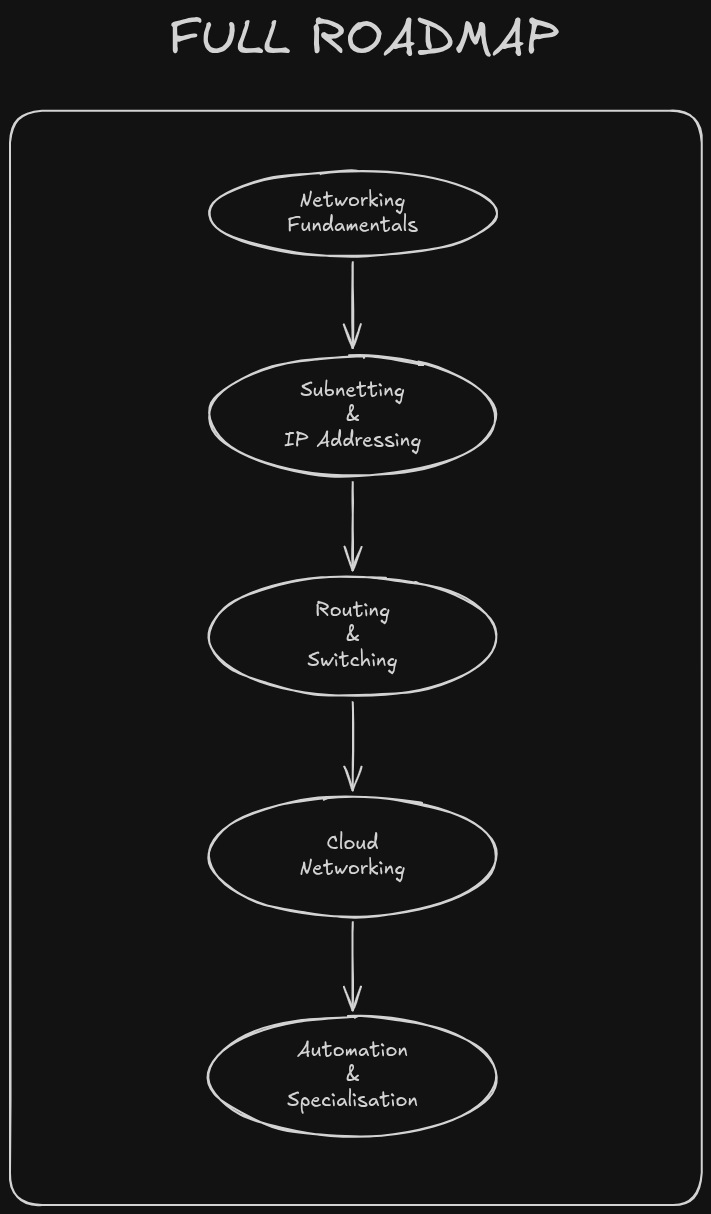
Stage 1 - Networking Fundamentals (6-8 weeks)
Before touching a router configuration, the concepts underneath need to be solid.
Learn: the OSI model and what happens at each layer, TCP/IP addressing and how devices are identified on a network, how switches forward traffic within a local network, how routers move traffic between networks, DNS and how names resolve to addresses, and the basics of network cabling and physical topology.
If you’ve already been through the cybersecurity post’s Stage 1, you’ve got a head start here - this stage goes considerably deeper into the mechanics than that post needed to.
Jeremy’s IT Lab on YouTube is the strongest free resource for this entire stage - a full, structured CCNA course that starts from the absolute basics and builds up. Worth watching alongside this roadmap rather than after it.
You’re ready to move on when: You can explain what happens at every layer of the OSI model using a real example, and describe the difference between what a switch does and what a router does without hesitating or stuttering.
Stage 2 - Subnetting & IP Addressing (4-6 weeks)
Subnetting is the single most common thing that trips people up in networking, and it’s also the thing that separates people who can talk about networking from people who can actually design one.
Learn: binary and how it relates to IP addressing, subnet masks and CIDR (Classless Inter-Domain Routing) notation, how to calculate subnets and usable host ranges by hand, VLSM (Variable Length Subnet Masking), and IPv6 addressing fundamentals - increasingly relevant and increasingly asked about in interviews.
Practice this until it’s automatic. Nobody who does this job well is counting on their fingers during an interview whiteboard question.
You’re ready to move on when: You can subnet a network on paper, without a calculator, in under a minute.
Stage 3 - Routing & Switching in Practice (8-10 weeks)
This is where the fundamentals turn into hands-on configuration skill, and where the home lab later in this post becomes essential.
Learn: VLANs and how to configure them, trunking between switches, static routing, dynamic routing protocols - starting with OSPF, since it’s the most commonly tested and deployed interior gateway protocol - access control lists (ACLs), Network Address Translation (NAT), and basic troubleshooting methodology using ping, traceroute, and show commands on Cisco IOS.
Work through Cisco Packet Tracer or GNS3 labs constantly during this stage. Reading about routing protocols is not the same as configuring one and watching it converge.
You’re ready to move on when: You can build a small multi-router, multi-switch topology from scratch, get it fully routing traffic, and troubleshoot it when something breaks - without a walkthrough.
Stage 4 - Cloud Networking (6-8 weeks)
This is the stage that separates engineers who are future-proofed from engineers who aren’t, and it directly follows from the Verdict above.
Learn: Virtual Private Cloud (VPC) concepts in at least one major cloud platform - AWS is the most widely deployed and the best starting point - subnets and route tables in a cloud context, security groups and network ACLs, VPN and Direct Connect / ExpressRoute for hybrid connectivity between on-premises and cloud networks, and load balancing fundamentals.
Everything from Stages 1 through 3 transfers directly here. Subnetting is subnetting whether it’s a physical VLAN or a cloud VPC subnet - the concepts are identical, only the interface changes.
You’re ready to move on when: You can design and deploy a basic VPC with public and private subnets, correctly configured route tables, and appropriate security group rules, in a cloud platform of your choice.
Stage 5 - Automation & Specialisation (Ongoing)
At this point you have the foundation every network engineer needs, physical and cloud. Now it branches.
Automation: Python fundamentals applied to networking (libraries like Netmiko and NAPALM for interacting with network devices programmatically), and infrastructure-as-code tools like Ansible and Terraform for managing configuration at scale. This is quickly becoming a baseline expectation rather than a nice-to-have.
Specialise from here into cloud networking (going deeper on multi-cloud and hybrid architectures), network security (firewalls, zero trust, and eventually crossing over into the cybersecurity and ethical hacking paths on this blog), or SDN/SD-WAN platforms specifically.
The foundation is the same for everyone. What you build on top of it, per the Verdict above, is what determines where your career actually lands.
Build Your First Home Lab
You don’t need racks of Cisco hardware to start practising network engineering. Two free tools cover essentially everything a beginner needs, and neither requires spending a naira or dollar on physical equipment.
Cisco Packet Tracer is Cisco’s own network simulation tool, free with a Cisco Networking Academy account. It’s simplified compared to real hardware, which makes it the better starting point - the interface is forgiving, the visual topology builder is intuitive, and it’s specifically designed for people learning routing and switching for the first time.
GNS3 is a more advanced, open-source network emulator that can run actual Cisco IOS images (which you provide separately) alongside virtual machines, giving you a far more realistic environment than Packet Tracer. Move here once Packet Tracer starts feeling too simple - typically partway through Stage 3 of the roadmap above.
Here’s a lightweight walkthrough of a first lab using Packet Tracer, covering exactly the kind of topology you’ll build repeatedly through Stage 3.
The topology: two routers, one switch per router, and one PC per switch - representing two separate offices that need to talk to each other.
- Place two routers, two switches, and two PCs in the workspace, and cable them: PC to switch, switch to router, router to router.
- Assign IP addresses to each PC and each router interface, making sure each office sits on its own subnet - this is Stage 2’s subnetting knowledge put directly into practice.
- Configure a static route on each router pointing to the other office’s subnet, through the connecting link.
The router configuration looks roughly like this:
Router(config)# interface gigabitethernet0/0
Router(config-if)# ip address 192.168.1.1 255.255.255.0
Router(config-if)# no shutdown
Router(config-if)# exit
Router(config)# ip route 192.168.2.0 255.255.255.0 10.0.0.2
Command Breakdown
interface gigabitethernet0/0selects the interface you’re configuring.ip addressassigns that interface an IP address and subnet mask.no shutdownenables the interface - Cisco interfaces are administratively disabled by default, a detail that catches every beginner at least once.ip routeadds a static route telling the router how to reach a network it isn’t directly connected to.
- Repeat the equivalent configuration on the second router, pointing back to the first office’s subnet.
- Test it: from PC1, ping PC2. If it doesn’t work the first time - and it usually doesn’t - that’s not a failure, that’s the actual job. Check your IP addressing, check your subnet masks, check that both interfaces are up, and check your static routes. Troubleshooting a broken topology is a bigger part of this skill than building a working one from a tutorial ever will be.
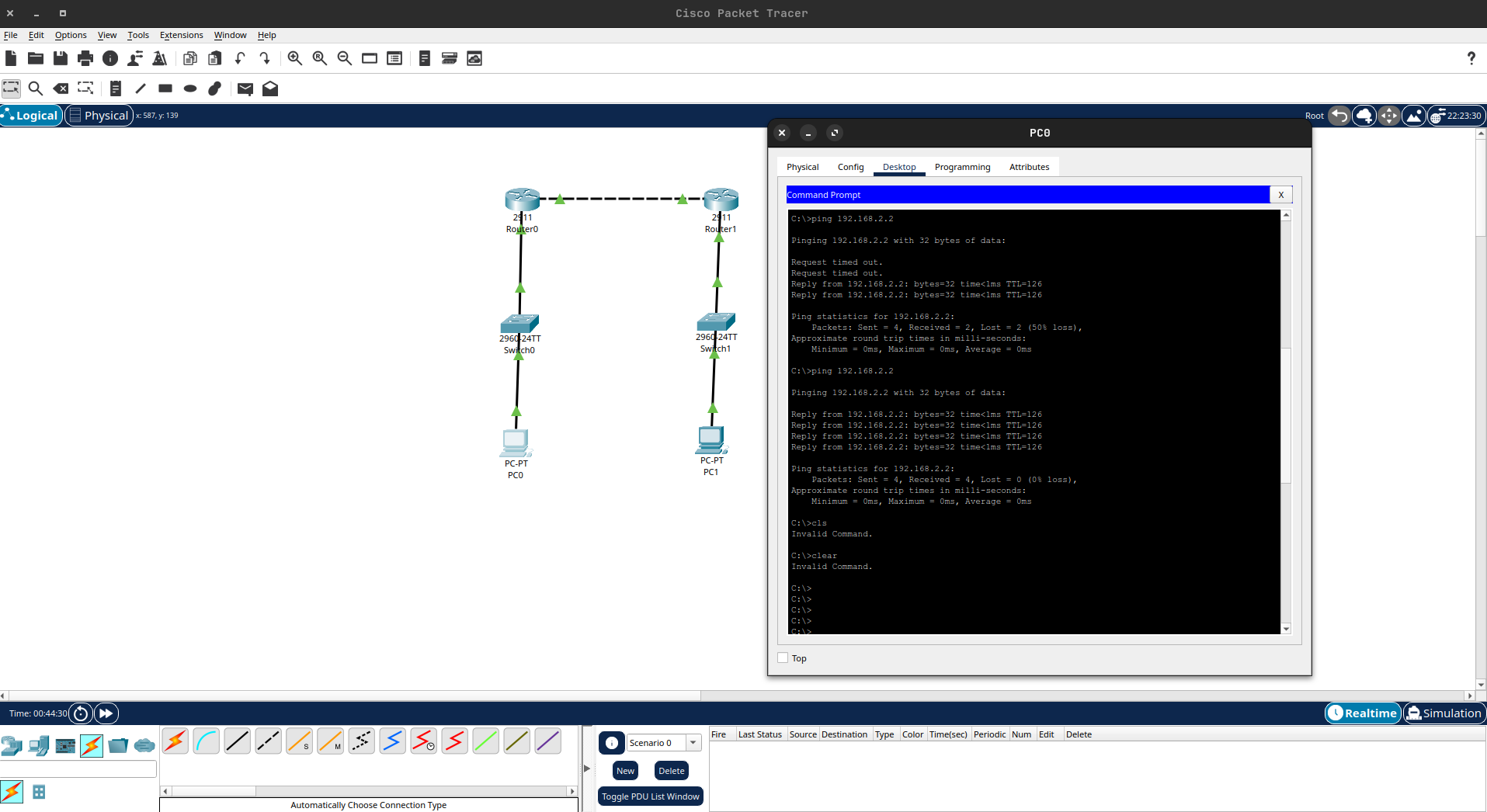
Once static routing between two offices feels routine, rebuild the same topology using OSPF instead of static routes, then add a third router and watch the routing table converge automatically. That’s the natural next lab, and it’s exactly what Stage 3 of the roadmap expects you to be comfortable with.
The Certifications That Actually Matter
Networking is a field where certifications carry genuine, measurable weight with employers - more so than in most areas of tech - because hands-on, practical exams are hard to fake and hiring managers know exactly what each certification actually validates.
CompTIA Network+ (Start Here)
Network+ is the accessible entry point - vendor-neutral, covering core networking concepts without requiring you to commit to a specific vendor’s ecosystem first. It’s a reasonable first certification if you want an early credential while still working through Stages 1 and 2 of the roadmap, though it’s optional if you’re planning to go straight for CCNA.
CCNA - Cisco Certified Network Associate (The Industry Standard)
CCNA is the certification that matters most in this field. It’s vendor-specific to Cisco, but Cisco’s dominance in enterprise networking means CCNA knowledge transfers broadly, and the certification itself is recognised and expected across the industry regardless of what hardware a given employer actually runs.
The current CCNA exam covers network fundamentals, routing and switching, IP connectivity, security fundamentals, and automation and programmability - which means Cisco itself has already baked the “don’t stop at traditional networking” message from the Verdict section directly into what the exam requires you to know.
Pursue this after completing Stage 3 of the roadmap. Attempting it before you’re comfortable configuring routing and switching by hand makes the exam considerably harder than it needs to be.
CCNP - Cisco Certified Network Professional (Advanced)
CCNP is the next rung for engineers heading toward senior or specialist roles - considerably deeper than CCNA, with tracks specific to enterprise networking, security, and data centre. It’s a Stage 5+ certification, pursued once you’ve got real working experience or advanced lab practice behind CCNA-level knowledge, not immediately after passing CCNA.
Cloud Networking Certifications (Where the Verdict Points)
This is the section that matters most if you’ve taken the Verdict above seriously. AWS Certified Advanced Networking - Specialty and Microsoft Certified: Azure Network Engineer Associate validate exactly the cloud networking skills covered in Stage 4 of the roadmap, and they’re what turn a traditional networking background into the higher-value profile employers are increasingly asking for.
Pursue one of these after Stage 4, once you’ve actually built VPCs and configured cloud routing hands-on rather than just reading about it.
Where It Can Take You
The foundation this roadmap builds doesn’t lock you into one narrow job title. Here’s where it actually leads.
Cloud Engineering is the most natural next step for engineers who go deep on Stage 4. Cloud infrastructure is networking with a different interface, and network engineers who make this transition tend to have a stronger grasp of what’s actually happening under a cloud platform’s abstractions than engineers who came from a purely software background.
Cybersecurity and Network Security is the other major branch, and it’s a two-way relationship - the cybersecurity post on this blog starts with networking fundamentals for exactly the same reason this post exists. A network engineer who pushes into security is already ahead of security professionals who are still catching up on networking. If offensive security specifically interests you, the ethical hacking post covers the full path from that side, including network penetration testing - a specialisation that leans directly on everything in this post’s roadmap.
Network Automation and DevOps is where engineers who lean into Stage 5’s automation content tend to land - a role that sits at the intersection of networking and software engineering, increasingly in demand as more of the job shifts from manual configuration to code.
Network Architecture is the senior-level destination for engineers who stay on the traditional infrastructure path and go deep rather than broad - designing the networks that everyone else configures and maintains.
None of these paths require abandoning what you build in this roadmap. They all require it as the starting point.
Tools You’ll Work With
These show up constantly across the roadmap stages above. You’ll pick most of them up progressively rather than all at once.
- Cisco Packet Tracer - free network simulation tool from Cisco, the standard starting point for learning routing and switching hands-on without hardware.
- GNS3 - open-source network emulator capable of running real Cisco IOS images for more realistic lab practice than Packet Tracer allows.
- Wireshark - packet capture and analysis tool. Essential for actually seeing what’s happening on the wire rather than guessing.
- PuTTY / SecureCRT - terminal clients used to connect to network devices via SSH or console cable.
- Ansible - automation tool used to push configuration across multiple network devices at once, central to Stage 5.
- Terraform - infrastructure-as-code tool, heavily used for provisioning cloud networking resources declaratively.
- SolarWinds / PRTG - network monitoring platforms used to track device health, bandwidth utilisation, and outages in production environments.
- Nmap - the same network scanning tool covered on the cybersecurity and ethical hacking posts, equally useful here for network discovery and troubleshooting.
Resources Worth Your Time
Platforms
- Cisco Networking Academy (NetAcad) - free structured courses covering networking fundamentals through CCNA-level content, and the source of a free Packet Tracer licence.
- GNS3 - official site for the network emulator, including documentation and community-maintained lab templates.
Fundamentals & CCNA
- Professor Messer - free, high-quality video courses covering Network+ and other CompTIA certifications in depth.
- Udemy - search for well-reviewed CCNA prep courses here; several of the most respected CCNA instructors in the industry publish their full courses on this platform.
- Jeremy’s IT Lab - a free, complete CCNA 200-301 course on YouTube, widely regarded as one of the best structured video resources for learning networking from the ground up.
Cloud Networking
- AWS VPC Documentation - the official reference for Amazon’s virtual networking service, and the best place to actually understand what you’re building in Stage 4.
- Azure Virtual Network Documentation - equivalent official documentation for Azure’s networking model.
Certifications
- CCNA - Cisco - official certification page with exam topics, structured directly around what this roadmap covers.
- AWS Certified Advanced Networking - Specialty - official page for the cloud networking certification referenced in the Verdict section above.
Common Mistakes
-
Skipping subnetting practice: This is the single most common reason people stall in networking. Subnetting isn’t optional background knowledge - it’s load-bearing for everything from Stage 3 onward, including cloud networking. Practice it until it’s automatic, not until it’s passable.
-
Treating cloud networking as optional: Given everything covered in the Honest Analysis and Verdict sections, this one should be self-explanatory. Engineers who never go past traditional routing and switching are increasingly competing for a shrinking part of the job market.
-
Memorising CCNA answer dumps instead of lab practice: CCNA is a practical certification underneath its multiple-choice format. Passing it through memorisation without hands-on lab time produces a certificate that doesn’t hold up in an actual job - and it shows immediately in a technical interview.
-
Assuming you need physical hardware to start: Packet Tracer and GNS3 cover the overwhelming majority of what a beginner needs. Waiting until you can afford real Cisco equipment before starting to lab is a delay tactic, not a requirement.
-
Ignoring automation: Manual, device-by-device configuration is a shrinking part of how networking gets done in any organisation with more than a handful of devices. Stage 5’s automation content isn’t an advanced extra - it’s increasingly baseline.
-
Never learning to troubleshoot deliberately: Following a tutorial that works on the first try teaches you very little. Break your own lab topologies on purpose, then fix them without looking anything up. That skill - not the ability to follow a guide - is what the job actually tests for.
Frequently Asked Questions
No - it moved, it didn't disappear. Cloud platforms are built on the same networking concepts (subnetting, routing, VPCs) expressed through a different interface, and cloud providers themselves employ large numbers of network engineers to run the physical infrastructure underneath. What's true is that engineers who never go beyond traditional on-premises routing and switching are competing for a shrinking part of the market. The Honest Analysis and Verdict sections above cover this in full.
No. Cisco Packet Tracer and GNS3 are both free and cover essentially everything a beginner and intermediate learner needs. Physical hardware becomes useful much later, if at all, once you're working with equipment that behaves in ways simulators don't fully replicate - a concern for advanced, specialised work, not for learning the fundamentals.
Network+ is optional. It's a reasonable early credential if you want something to show for Stages 1 and 2 of the roadmap while you keep building toward CCNA, but it isn't a prerequisite. If you're focused and consistent, going straight for CCNA after completing Stage 3 is a perfectly reasonable path, and it's the certification that actually matters most to employers.
Following this roadmap with consistent effort, most people reach a junior-level, job-ready standard - meaning CCNA-level knowledge plus real hands-on lab practice - in roughly 6 to 10 months. Pushing into cloud networking and automation on top of that, per the Verdict above, typically adds another few months but significantly strengthens the resulting job search.
Yes, and it's one of the stronger ones available. Cybersecurity work is inseparable from understanding how traffic actually moves across a network - which is exactly what this roadmap builds. The cybersecurity post and ethical hacking post on this blog both start with networking fundamentals for this exact reason - a network engineer moving into security work is starting from a genuine advantage over someone learning networking and security simultaneously from scratch.
Not at an advanced level, but basic Python and comfort with tools like Ansible are increasingly expected, particularly for automation-focused roles covered in Stage 5. You don't need to be a software engineer, but you do need to be able to read and write simple scripts that interact with network devices programmatically. Engineers who skip this are limiting themselves to the more manual, lower-paying end of the field.
Where to Go From Here
You’ve got the full picture: what network engineering actually covers in 2026, an honest breakdown of what’s changed and what hasn’t, a clear verdict on whether it’s worth pursuing, salaries and demand, a complete roadmap from fundamentals to cloud and automation, a home lab you can build for free, and the certifications that actually matter.
The next step is simple: install Cisco Packet Tracer, build the two-router topology from the home lab section, and get it routing traffic. Everything else in this roadmap builds from that first working lab.
If networking is pulling you toward security rather than infrastructure specifically, the cybersecurity post and ethical hacking post on this blog are the natural next reads - both lean directly on the fundamentals covered here.
For questions, lab screenshots, or just to talk through the path - the community links are in the footer.