How to Get into Back-end Development in 2026
If you’ve read the Front-end vs Back-end post, you already know what back-end development is at a surface level - the servers, the databases, the code that runs behind the scenes and powers everything a user interacts with. If you’ve also read the front-end post, you know what the other side of the fence looks like.
This post is for the people who read all of that and landed on back-end. It’s a complete getting-started guide - what the learning experience actually looks like, an honest take on the path we’re recommending, what the job market looks like, and a full roadmap that takes you from zero to building real back-end systems.
No sugarcoating. Back-end development has a longer ramp-up than front-end and the learning path we’re recommending is deliberately not the easiest one. But by the end of this post, you’ll understand exactly why - and exactly what awaits you on the other side of it.
Let’s get into it.
What You’re Actually Getting Into
The first thing to understand about learning back-end development is that the feedback loop is completely different from front-end.
When you write front-end code, you save the file, refresh the browser, and see the result immediately. Something moves, something changes colour, something appears or disappears. The feedback is instant and visual, and that immediacy makes the early learning stages genuinely engaging.
Back-end development doesn’t work like that.
You write a server, run it, and - if it works - nothing happens on screen. There’s no animation, no colour change, no visible output. There’s a terminal sitting there telling you the server is running on port 8080, and that’s it. You send a request using a tool like Postman, and if everything goes right you get back a response in JSON format. To someone early in their learning journey, that can feel underwhelming.
Here’s what’s actually happening, though: your code just received an HTTP request, processed it, queried a database, applied business logic, and returned structured data - all in milliseconds and all on a machine that could be sitting in a data centre on the other side of the world. The feedback isn’t visual because the output isn’t meant for a human to look at directly. It’s meant for a front-end to consume, for another service to process, for a mobile app to display.
Understanding this shift in mindset early makes a significant difference. You’re not building things people see. You’re building the systems that make everything else possible.
The other thing to understand is the abstraction level. Front-end code is close to the surface - you’re working directly with what appears on screen, and the connection between your code and the result is easy to trace. Back-end code operates at a deeper level. You’re thinking about data models, request lifecycles, database relationships, authentication flows, error handling across distributed systems and so much more. The concepts are more abstract, the debugging is more involved, and the time between “I understand the basics” and “I can build something real” is longer.
None of that is a reason not to do it. It’s a reason to go in knowing what to expect.
The Honest Disclaimer
Here’s where we tell you something most back-end tutorials won’t.
We’re going to recommend Java and Spring Boot as your starting point. Not Python. Not Node.js. Not the framework with the gentlest learning curve or the one that gets you to a running server in ten lines of code. Java - a statically typed, object-oriented language that requires you to set up a JDK, understand classes and interfaces before you write a single API endpoint, and configure more things upfront than you’ll probably want to.
So why Java?
Because the frameworks that feel easier - Django, Express, Laravel - work by hiding things from you. They abstract away the details of how a server handles requests, how dependency injection works, how database connections are managed, how authentication is structured under the hood. Of course that’s a really good thing if, and that’s a big IF, you already understand what’s being abstracted. When you don’t, you end up with working code you can’t fully explain - and that becomes a problem the moment something breaks or the moment an interviewer asks you how it works.
Java forces you to understand the fundamentals because it doesn’t let you skip them. Spring Boot, despite its reputation for complexity, teaches you how back-end systems are actually structured - not just how to get one running. The patterns you learn in Spring Boot - dependency injection, separation of concerns, layered architecture - are the same patterns you’ll find underneath every other major back-end framework, just with fewer layers hiding them.
Analogy: Learning to drive in a car with automatic transmission gets you moving faster. Learning in a manual gives you a deeper understanding of how the vehicle actually works. Most people eventually drive automatics - but the ones who started on manual tend to be better drivers.
That said - we’re not going to pretend this path is a straight line from beginner to expert. It isn’t. It’s more like learning to navigate a rigid structure: there are walls, there are rules, there are moments where you’ll feel like the language is fighting you rather than helping you. That’s not a sign you’re doing it wrong. That’s Java doing exactly what it’s supposed to - making you think carefully about what you’re building before you build it.
Push through the difficult parts. Don’t abandon ship halfway through because a YouTube tutorial made Python look easier. The pay-off is a level of understanding that makes every other back-end framework easier to pick up, faster to learn, and easier to reason about when things go wrong.
After you’re solid with Java and Spring Boot, we’ll point you toward Node.js and Django. At that stage, you’ll actually understand what they’re doing for you - and you’ll use them better because of it.
Jobs, Salaries & Demand in 2026
Let’s talk about what’s waiting on the other side of this.
The Job Market
Back-end developers are in consistent, high demand - and that demand has only grown as software systems have become more complex, more distributed, and more reliant on the kind of infrastructure that back-end developers build and maintain.
Every company that has a product running on the internet has a back-end. Every mobile app pulling data from a server has a back-end. Every e-commerce platform, every Fintech app, every SaaS tool - all of it runs on back-end systems that need to be built, maintained, scaled, and secured. The visibility of the work is low. The importance of it is not.
In-demand skills in 2026:
- Java and Spring Boot - Still dominant in enterprise, Fintech, and large-scale systems
- Python - increasingly tied to back-end AI tooling, data pipelines, and API development
- Node.js - widely used in startups and JavaScript-heavy teams
- Cloud platforms (AWS, GCP, Azure) - expected at mid-level and above
- Docker and containerization - increasingly standard, not just a bonus
- SQL and database design - non-negotiable at every level
- API security, authentication (JWT, OAuth 2.0) - in demand across the board
- DevOps basics - CI/CD pipelines, deployment, monitoring
Salary Ranges (Approximate, 2026)
| Level | Nigeria (NGN/year) | Global Remote (USD/year) |
|---|---|---|
| Junior | ₦2M – ₦4M | $40,000 – $70,000 |
| Mid-level | ₦4M – ₦9M | $70,000 – $120,000 |
| Senior | ₦9M – ₦20M+ | $120,000 – $200,000+ |
Disclaimer: These are directional figures - actual pay varies by company size, industry, location, and your specific skill set. Remote roles working with international clients or companies tend to pay significantly above local market rates.
Career Paths from Back-end
Starting in back-end opens doors in multiple directions: API Engineering, Cloud Engineering, DevOps and Site Reliability Engineering (SRE), Data Engineering, Back-end Architecture, and - as AI continues to reshape the industry - ML Engineering and AI infrastructure roles. Back-end fundamentals are the foundation underneath all of them.
The Full Roadmap
The stages below are sequential. Each one builds directly on the last, and skipping ahead tends to create gaps that surface at the worst possible time - usually when you’re trying to debug something you don’t fully understand. Work through them in order.
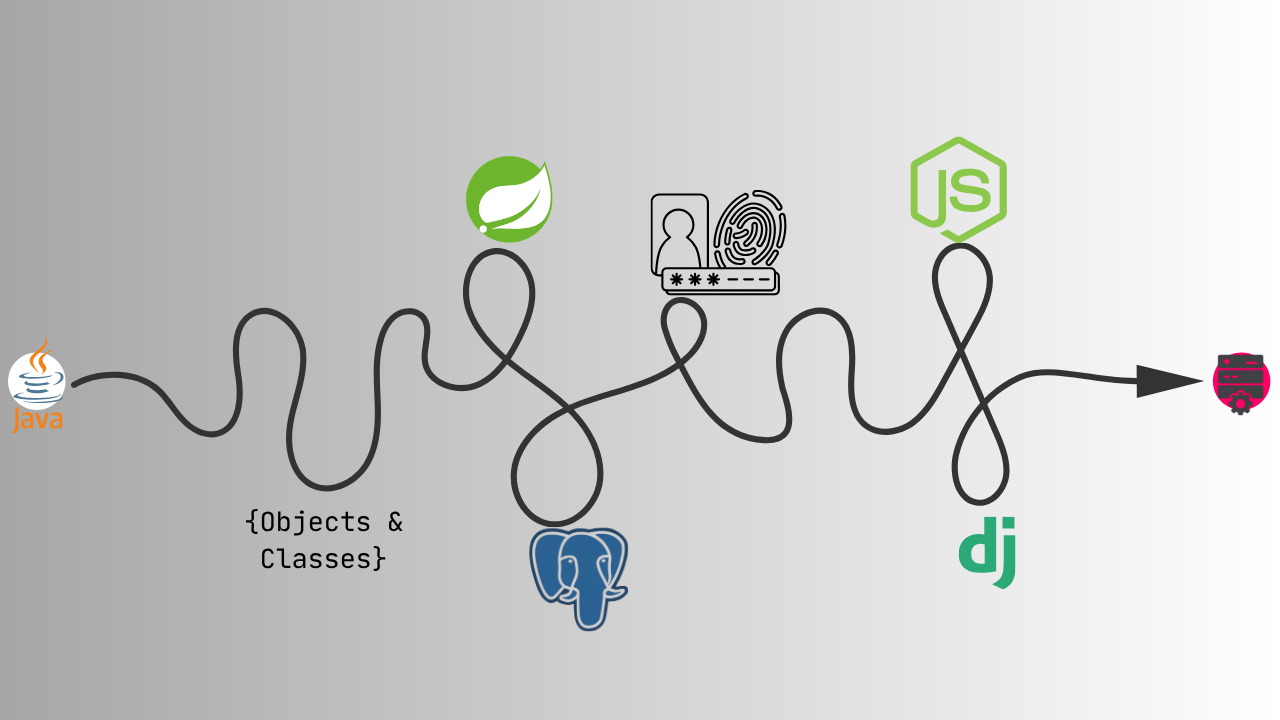
Stage 1 - Java Fundamentals (4–6 weeks)
Before Spring Boot, before servers, before any of that - Java itself.
Start with the core language: variables and data types, control flow (conditionals and loops), methods, arrays, and how Java programs are structured. Java is a compiled, statically typed language - which means you declare what type a variable is when you create it, and the compiler checks your code for type errors before it runs. That’s different from Python or JavaScript, and it takes some adjustment.
Install the JDK (Java Development Kit) and set up IntelliJ IDEA - the standard IDE for Java development, and significantly more useful than a plain text editor for a language this “verbose”. Get comfortable writing and running simple programs from the command line before you rely on the IDE to do everything.
You’re ready to move on when: You can write a Java program that reads input, applies logic (conditionals, loops), and produces output - without looking anything up.
Stage 2 - Object-Oriented Programming & Design Patterns (4–6 weeks)
This is the stage most beginners underestimate and the one that makes everything else in Java make sense.
Java is an object-oriented language at its core. Everything is a class. Understanding OOP - classes, objects, inheritance, encapsulation, polymorphism, and interfaces - isn’t optional in Java the way it might be in Python. You will need this to understand Spring Boot’s architecture, because Spring Boot is built entirely on OOP principles.
After the OOP fundamentals, get a basic understanding of common design patterns - particularly the ones Spring Boot uses heavily: Singleton, Factory, and Dependency Injection. You don’t need to memorise every pattern in the book. You need to understand why they exist and what problem they solve.
You’re ready to move on when: You can design a simple Java application using multiple classes, interfaces, and inheritance - and explain why you structured it the way you did.
Stage 3 - Spring Boot (8–12 weeks)
This is where back-end development begins in earnest.
Spring Boot is a framework built on top of the larger Spring ecosystem that simplifies the setup and configuration of Java back-end applications. It handles a lot of the boilerplate - server setup, dependency management, configuration - so you can focus on writing application logic. But the term “simplifies” is relative. Compared to Express or Django, Spring Boot is still more involved. Compared to raw Spring, it’s dramatically easier.
Work through these concepts in order:
- Spring MVC - how Spring handles HTTP requests and routes them to the right code (controllers, request mappings, HTTP methods)
- Dependency Injection - Spring’s core concept; how components are wired together without hard-coding their dependencies
- Spring Data JPA - how Spring connects to and queries databases using Java objects rather than raw SQL
- Spring Security - authentication and authorization; how to protect endpoints and manage who can access what
- Exception handling - how to handle errors gracefully and return meaningful responses instead of raw stack traces
Build things throughout this stage. A simple task manager API. A basic user authentication system. A blog post CRUD API. The concepts don’t stick without building.
You’re ready to move on when: You can build a REST API with Spring Boot that connects to a database, handles authentication, and returns proper responses - including error responses - without following a tutorial.
Stage 4 - Databases (6–8 weeks, run alongside Stage 3)
Back-end development without databases is incomplete. Start this stage while you’re working through Spring Boot - the two are deeply connected and learning them in parallel reinforces both.
Start with SQL and relational databases. PostgreSQL is the recommendation here - it’s powerful, widely used in production, and what most serious back-end teams reach for. Learn the core operations: SELECT, INSERT, UPDATE, DELETE. Then learn joins, which is how you query data spread across multiple related tables. Then indexes, which is how you make those queries fast.
Understand database design: how to structure tables, how to define relationships between them (one-to-one, one-to-many, many-to-many), and what normalization means and why it matters.
After relational databases, get a working understanding of NoSQL - specifically MongoDB as a representative document database. You don’t need to go as deep here, but you need to understand when and why you’d choose one over the other.
You’re ready to move on when: You can design a database schema for a real-world application, write queries that span multiple tables, and connect it to a Spring Boot application using Spring Data JPA.
Stage 5 - APIs & Authentication (4–6 weeks)
By this point you’ve been building APIs with Spring Boot, but this stage is about understanding them properly.
REST (Representational State Transfer) is the standard architectural style for back-end APIs. Learn the conventions: HTTP methods (GET, POST, PUT, PATCH, DELETE), status codes (200, 201, 400, 401, 403, 404, 500 - and what each one actually means), and how to structure endpoints that are predictable and consistent.
Then authentication. Two things to understand deeply:
- JWT (JSON Web Tokens) - the most common way to handle stateless authentication in REST APIs. A user logs in, the server issues a token, and the client sends that token with every subsequent request. The server verifies it without needing to store session data.
- OAuth 2.0 - the standard for third-party authentication (“Login with Google”, “Login with GitHub”). You don’t need to implement it from scratch, but you need to understand the flow.
You’re ready to move on when: You can build a fully authenticated REST API - registration, login, protected routes, token refresh - and explain how each part of it works.
Stage 6 - Node.js and Django (8–12 weeks, after Stage 5)
You’ve earned this stage. With Java and Spring Boot under your belt, you now understand what back-end frameworks are doing under the hood - and that makes learning new ones dramatically faster.
Node.js with Express - JavaScript on the server side. If you’ve done any front-end work, the language is already familiar and if not, it is still easy to get into. Express is minimal by design - it gives you routing and middleware and leaves everything else to you. After Spring Boot, it’ll feel almost shockingly light. That’s not a flaw; it’s a different philosophy. You’ll appreciate it more because you understand what it’s not doing for you.
Django - Python’s flagship web framework. Opinionated, batteries-included, and fast to work with once you know Python. Django’s ORM, its admin panel, and its built-in authentication system are genuinely impressive tools. The patterns will look familiar - they’re the same patterns you learned in Spring Boot, just expressed differently in Python.
You don’t need to master both immediately. Pick the one that aligns with where you want to work - Node.js if you’re leaning toward JavaScript-heavy teams or startups, Django if you’re interested in Python, data-adjacent work, or AI infrastructure.
You’re ready to move on when: You can build and deploy a production-ready API in one of these frameworks, with a database, authentication, and proper error handling - and you can articulate the differences between it and what you built in Spring Boot.
What Back-end Development Looks Like in Practice
Since there’s no UI to look at, it helps to have a concrete picture of what a back-end developer’s day actually involves.
Requests and Responses
Everything in back-end development starts with a request. A user opens an app, clicks a button, submits a form - and somewhere in the chain, an HTTP request gets sent to a server. The back-end receives that request, figures out what’s being asked, does whatever processing is needed, and sends back a response.
That response might be a JSON object containing a list of products, a confirmation that a payment went through, or an error message explaining why the request failed. The back-end doesn’t care how any of that gets displayed. It just ensures the right data comes back in the right format.
Business Logic
Business logic is the rules that govern how your application behaves. Can this user access this resource? Does this order have enough stock to be fulfilled? Should this transaction be flagged for review? None of these decisions happen on the front-end. They happen in the back-end, in code that applies the rules of the system to the data it receives.
This is one of the parts of back-end development that’s hardest to teach with a tutorial - because business logic is specific to the application you’re building. But it’s also one of the most intellectually interesting parts of the job. Writing code that enforces complex rules correctly, handles edge cases gracefully, and stays maintainable as requirements change is genuinely satisfying work.
Databases
Almost every back-end operation involves a database at some point. Fetching a user’s profile, saving a new post, updating an order status - all of it is a database read or write under the hood. Back-end developers spend a meaningful amount of time writing queries, designing schemas, and optimising database operations that are running too slowly.
A slow database query doesn’t show up as a broken feature. It shows up as a page that takes three seconds to load instead of one - and users notice. Learning to write efficient queries and to think about database performance is a core part of the job, not an advanced topic.
Debugging Without a UI
When something breaks on the front-end, you can usually see what’s wrong. When something breaks on the back-end, you’re reading logs, tracing request paths through multiple layers of code, and checking what the database actually contains versus what it should contain.
Back-end debugging is methodical work. You learn to read stack traces, to add logging at strategic points, to use tools like Postman to isolate exactly where a request is failing. It’s a skill that develops over time, and developing it makes you significantly more effective as a developer.
Tools You’ll Work With
These are the tools that make up the back-end development workflow. You’ll pick them up progressively - not all at once.
- IntelliJ IDEA - the standard IDE for Java and Spring Boot development. The Community edition is free and more than capable for everything in this roadmap.
- Postman - a tool for sending HTTP requests to your API and inspecting the responses. This is how you test back-end endpoints without needing a front-end. You’ll use this constantly.
- Git & GitHub - version control, non-negotiable. If you’ve been through the Linux post or the Bash post, you know how important it is and you’ve already started here.
- PostgreSQL + pgAdmin - your primary database and the GUI tool for managing it. pgAdmin lets you inspect your database visually while you’re learning, which helps bridge the gap between your code and what’s actually being stored.
- Docker - containerization. Docker lets you package your application and its dependencies into a container that runs consistently across any machine. You don’t need to go deep on Docker early, but get a working understanding of what it does and why teams use it - because you will encounter it.
- AWS (or any cloud platform) - eventually you’ll need to deploy something to a real server. AWS is the most widely used cloud platform in industry. Start with the basics: EC2 (virtual machines), S3 (file storage), and RDS (managed databases). Again, not a day-one concern…but a one-day concern.
- The terminal - back-end developers live here even more than front-end developers. Running servers, querying databases, deploying applications, reading logs - all of it happens in the terminal. If you’re on Linux and not comfortable here yet, the Bash scripting post is worth reading before you go further.
Resources Worth Your Time
Curated, not exhaustive. Chosen because they’re actually good.
Java
- dev.java - Official Java Learning Path - the official Oracle resource for learning Java. Well-structured, accurate, and updated. Start here for the language fundamentals.
- Baeldung - the most comprehensive Java and Spring resource on the internet. Not a linear tutorial - use it as a reference when you need to understand a specific concept in depth. Bookmark it immediately.
Spring Boot
- Spring official guides - short, focused guides for specific Spring Boot tasks (building a REST service, connecting to a database, adding security). The best way to get hands-on with specific features without a long course commitment.
- Baeldung’s Spring Boot section - deep, technical, and accurate. Every concept you encounter in Spring Boot has a Baeldung article explaining it properly.
Databases
- PostgreSQL Tutorial - a clean, well-structured introduction to PostgreSQL and SQL. Covers everything from basic queries to joins, indexes, and transactions.
- Use The Index, Luke - a free resource dedicated entirely to SQL performance and indexing. Not for day one, but essential reading before you consider yourself solid on databases.
Node.js & Django
- Node.js official documentation - start here. The docs are well-written and the getting started section is genuinely useful.
- Django official tutorial - the best introduction to Django available. Builds a complete application from scratch across multiple parts. Follow it completely before branching out to other resources.
General
- roadmap.sh - Back-end Roadmap - a comprehensive visual map of everything in the back-end development ecosystem. Useful for understanding the full landscape and knowing what exists beyond this roadmap - not as a checklist to complete all at once.
Common Mistakes while learning
- Authorization != Authentication: A lot of beginners treat authentication and authorization as the same thing, which leads to insecure systems and broken access control. Take it this way - Authentication is about verifying who a user is, while Authorization is about verifying what that user has access to. To avoid this, always separate identity verification from permission handling in your applications and understand where each one fits in your back-end flow.
- Skipping Database Fundamentals: Many beginners rely too heavily on ORMs or temporary in-memory arrays without understanding how databases actually work. This becomes a problem when applications grow and queries start becoming slow, messy, or difficult to manage. To avoid this, learn core database concepts early - tables, relationships, joins, indexing, and normalization - before depending too much on abstractions.
- Tutorial Hell: Constantly following tutorials can create the illusion of progress while preventing real problem-solving skills from developing. Many developers realize they cannot build projects independently once the tutorial is gone. To avoid this, spend more time building your own projects, experimenting, breaking things, and debugging without step-by-step guidance.
- Ignoring Security Early: Beginners often underestimate security and end up exposing secrets, trusting user input blindly, or storing sensitive data improperly. These mistakes can create serious vulnerabilities even in small projects. To avoid this, treat security as a core part of back-end development from the beginning by learning proper authentication, validation, password hashing, and secure handling of sensitive data.
Frequently Asked Questions
"Harder" is a strong word, I prefer the term "Different". Front-end has its own complexity - responsiveness, browser compatibility, performance, accessibility. Back-end complexity tends to be more abstract: distributed systems, database design, security, scalability. Most people find the back-end learning curve steeper early on because the feedback loop is slower and there's nothing visual to look at. That levels out once the fundamentals click.
Because Java forces you to understand the fundamentals that other frameworks hide. Django and Express are excellent tools - but they abstract away a lot of what's happening under the hood and that's not really good for someone who's pretty much learning everything from scratch. Learning Java and Spring Boot first means you understand what those abstractions are doing for you, which makes you better at using them and better at debugging them when something goes wrong. It's a harder starting point that pays off significantly down the line.
Following this roadmap with consistent daily practice, most people reach a job-ready level in 12 to 24 months. That's a wider range than front-end because the learning path is longer and the concepts are more abstract. The pace you set matters far more than the total time. Consistent daily practice will always beat sporadic bursts of effort, regardless of how long each session is.
No - but a basic understanding helps. Knowing how front-end code consumes an API, what it expects from a response, and how it handles errors makes you a better API designer. You don't need to be able to build front-end UIs. You just need to understand what the front-end is trying to do with the data you're sending it.
An API (Application Programming Interface) is the set of endpoints your back-end exposes for other systems to communicate with. When a mobile app fetches your profile, when a front-end submits a form, when one service needs data from another - all of that happens through an API. Building APIs that are reliable, secure, and well-designed is one of the core responsibilities of a back-end developer. It's not one part of the job - for many back-end roles, it is the job.
No. Like front-end, back-end development is portfolio-driven. What matters is what you can build and demonstrate. A GitHub profile showing real projects - APIs, database-backed systems, deployed applications - carries more weight than most degrees in a hiring context. The bar is higher than front-end in terms of the depth of understanding expected, but the path to getting there is the same: build things, understand what you built, and be able to explain it.
Where to Go From Here
You’ve got the full picture: what the back-end learning experience actually looks like, an honest take on why Java is the right starting point even though it’s the harder one, what the job market looks like, and a complete roadmap from Java fundamentals all the way through to Node.js and Django.
The next step is to start - and to start with Java. Install the JDK, open IntelliJ IDEA, and write your first program. Not a server, not an API - just a program. Get comfortable with the language before you reach for the framework. That patience early on is what separates developers who understand their stack from developers who are just following tutorials.
If you’re not set up on Linux yet, the Windows to Linux guide covers everything you need. And if the terminal still feels unfamiliar, the Bash scripting post is essential reading before you go further - back-end developers live in the terminal in a way that front-end developers simply don’t.
For questions, project feedback, or just to share what you’re building - the community links are in the footer.