How to Become an iOS Developer in 2026
If you’ve read the Mobile Developer post and the quiz pointed you here - or you already knew iOS was your lane before you got anywhere near a quiz - this is the full, deep breakdown. Everything shared across mobile platforms was already covered there. This post is entirely about what’s specific to building for Apple’s ecosystem.
One thing up front, addressed properly rather than glossed over: iOS development has a genuine hardware requirement that Android and cross-platform development don’t. It gets its own section further down, with real numbers, because it deserves better than a one-line disclaimer.
Let’s get into it.
What is iOS Development?
iOS development means building apps exclusively for Apple’s ecosystem - iPhone and iPad - using Apple’s own language and tooling.
Swift is the language. Apple’s own, modern, and the only realistic starting point in 2026 - Objective-C, the language iOS ran on for its first several years, still exists in a meaningful amount of legacy code, but nobody starts a new career learning it as their first language today.
SwiftUI and UIKit are the two frameworks used for actually building the interface, and understanding the difference between them - and why you’ll eventually need both - is one of the most important things this post covers. More on that in a moment.
Xcode is Apple’s official IDE - the only place Swift, SwiftUI, and UIKit actually come together into a running app, and the only tool that can submit something to the App Store.
The App Store is the sole distribution channel. Unlike Android, there’s no meaningful side-loading market for consumer apps - if you want real users, Apple’s review process is the gate you go through.
The Honest Analysis
On SwiftUI versus UIKit - the debate that actually matters: The honest numbers, not the oversimplified “SwiftUI is the future, forget UIKit” take you’ll see in a lot of beginner content. Roughly 70% of new iOS apps now use SwiftUI as their primary framework, up sharply from about 40% just a few years ago. At the same time, somewhere around 70-75% of iOS job postings still mention or require UIKit knowledge, because the enormous installed base of existing production apps - banks, airlines, healthcare, anything with a codebase measured in years, not months - isn’t getting rewritten just because a newer framework exists.
Those two numbers aren’t contradictory. They describe exactly where the industry actually sits: new projects default to SwiftUI, the installed base runs on UIKit, and the two frameworks interoperate cleanly enough (UIHostingController, UIViewRepresentable) that most production teams in 2026 use both in the same app rather than treating it as an either-or choice. The correct strategy, and the one this roadmap follows, is SwiftUI-first, with real UIKit fundamentals underneath - not one or the other.
On Apple Intelligence and Liquid Glass: iOS 26 - Apple renamed its versioning to match the year, so iOS 26 is what would have been “iOS 19” - shipped the biggest visual and architectural shift the platform has seen in years. Liquid Glass is the new system-wide design language: translucent, refractive, physical-feeling materials replacing the flat design that had been standard since iOS 7. Reception has been genuinely mixed - real usability critiques exist about legibility and visual noise - but Apple has confirmed Liquid Glass becomes mandatory for apps once Xcode 27 ships, so the usual wait and see if this blows over isn’t a viable strategy for anyone building a career here.
Alongside it, Apple’s Foundation Models framework brings genuine on-device AI capability directly into third-party apps - privacy-preserving, running locally rather than calling out to a server. This is a real, usable feature, not marketing language, and it’s quickly becoming a genuine differentiator on a CV rather than a buzzword to drop into a cover letter.
On fragmentation, compared honestly to Android: This is one of iOS’s real, structural advantages, and it’s worth naming directly rather than dancing around it. Apple controls a small, tightly managed set of devices and enforces OS-version adoption aggressively - the overwhelming majority of active iPhones run the current/previous major iOS version within months of release. Android’s device and OS-version spread is enormously wider by comparison. This doesn’t make iOS development easier in every sense, but it does mean you’re testing against a much smaller, more predictable set of realities than Android developers are - a genuine trade-off worth knowing before you commit.
The Verdict
Yes - iOS development is still a strong, well-compensated career path in 2026. But “I know Swift” stopped being a meaningful job-ready signal a while ago, for the same AI-driven, tutorial-completion reasons covered in both the App Developer and Mobile Developer posts. What actually matters now is real depth in one architecture pattern (MVVM is the dominant one, covered in the roadmap below), genuine comfort with both SwiftUI and UIKit rather than just one, and a shipped app you can talk through in detail.
Do You Actually Need a Mac?
Note: If you already own a Mac, then you can just go ahead and skip this section and move to the next one.
Yes, at some point in the pipeline - there’s genuinely no way around this. Apple’s toolchain requires macOS: compiling Swift into a signed, installable build, running the iOS Simulator, using Xcode’s debugger against a connected device, and submitting to App Store Connect all require macOS specifically. That part isn’t negotiable, and any guide that tells you otherwise is being genuinely misleading.
What is negotiable is whether you need to own one, especially early on. A few honest, current options:
- A used/refurbished Mac mini is the cheapest path to owning real hardware outright - an M2 Mac mini runs around $599, which pays for itself against ongoing rental costs within roughly a year of regular use if you’re doing this long-term.
- Dedicated cloud Mac rental - services like Rentamac, Macly, and MyRemoteMac rent you a real, dedicated Mac mini (not a shared VM) with full admin access over SSH or remote desktop, running Xcode natively. Pricing runs roughly $85-$150 a month for a dedicated machine, or as low as $3-4 a day for short-term, low-commitment use - a genuinely reasonable way to test whether you actually enjoy iOS development before spending real money on hardware.
- Shared/managed cloud Mac plans (MacInCloud, MacStadium) run cheaper - roughly $30-60 a month - but on a shared or virtualised basis rather than dedicated hardware, which can mean less consistent performance and less admin flexibility for installing your full toolchain.
The honest recommendation: If you’re still deciding whether iOS is genuinely your path, rent short-term before you buy anything. If you’ve already decided - which, if you’ve read this far and are still here, you probably have - a refurbished Mac mini is the better long-term value.
Jobs, Salaries & Demand in 2026
The Job Market
iOS roles remain consistently well-compensated relative to the rest of mobile development, driven partly by the App Store’s disproportionately high-spending user base compared to Android’s - companies building for iOS first are often optimising for revenue per user, not just raw install numbers. Demand has genuinely shifted, though: the productivity gains from SwiftUI mean fewer developers are needed to ship the same features than a few years ago, which has tightened the market at the generalist end while genuinely deep, specialised iOS developers remain hard to find and well paid.
Salary Ranges (Approximate, 2026)
| Level | Nigeria (NGN/year) | Global Remote (USD/year) |
|---|---|---|
| Junior | ₦2M - ₦4.5M | $45,000 - $75,000 |
| Mid-level | ₦4.5M - ₦9.5M | $75,000 - $130,000 |
| Senior | ₦9.5M - ₦21M+ | $130,000 - $200,000+ |
Disclaimer: These are directional figures - actual pay varies significantly by company, specialisation, and location. Developers with genuine depth in both SwiftUI and UIKit, plus real architecture experience, tend to sit toward the higher end of these ranges.
The Full Roadmap
This is the full zero-to-hero roadmap to follow in order to have the skills necessary to land a job or ship your first app on the App Store. Follow it stage-by-stage and move to the next stage only when you’ve satisfied the criteria to do so.
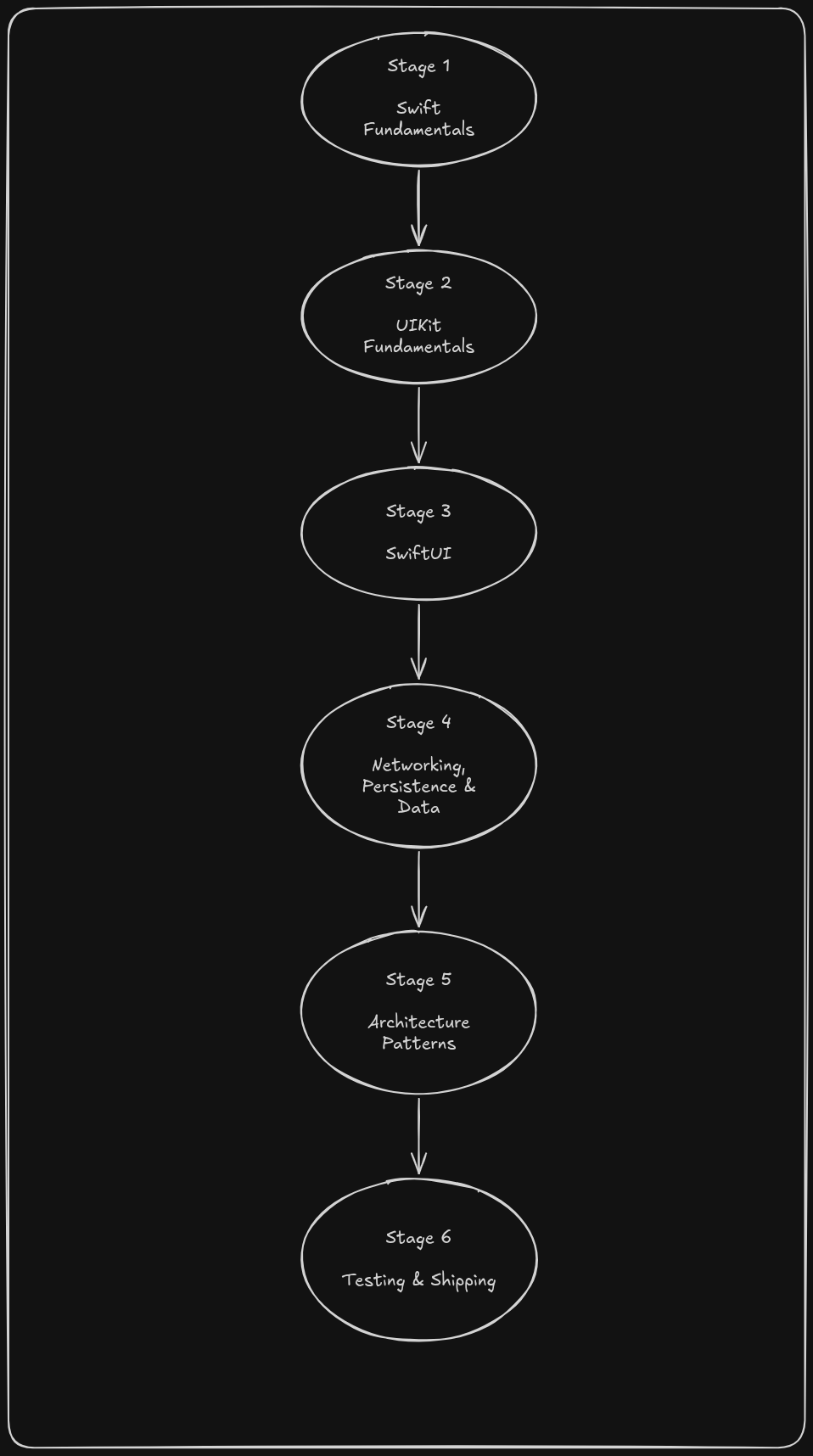
Stage 1 - Swift Fundamentals (4-6 weeks)
Variables, optionals, closures, protocols, and enums with associated values - Swift’s specific flavour of these concepts, which differs meaningfully from most other languages. Build small command-line programs first - a BMI calculator, a simple habit tracker - before opening Xcode’s interface tools at all. Understanding the language properly before touching UI makes everything after this stage considerably easier.
You’re ready to move on when: you can write and reason about Swift code involving optionals and protocols without constantly checking documentation.
Stage 2 - UIKit Fundamentals (6-8 weeks)
Yes, UIKit first, even though SwiftUI is where most new development happens. UIKit teaches you what’s actually happening underneath - view controllers, the responder chain, Auto Layout, navigation patterns - concepts SwiftUI abstracts away but that you’ll need the moment something breaks in a way SwiftUI can’t explain on its own. This is the same “learn the hard thing first” principle this blog applied to Java and Spring Boot in the back-end roadmap, for the same reason.
You’re ready to move on when: you can build a multi-screen app with UIKit, handling navigation and Auto Layout constraints, without following a tutorial.
Stage 3 - SwiftUI (6-8 weeks)
Now the framework where most of your actual day-to-day work will happen. Views, state management (@State, @Binding, @Observable), navigation, and how SwiftUI and UIKit interoperate through UIHostingController and UIViewRepresentable - because in 2026, knowing how to bridge the two is a real, expected skill, not an edge case.
You’re ready to move on when: you can build the same app from Stage 2 in SwiftUI, and explain concretely why you’d choose one framework over the other for a given screen.
Stage 4 - Networking, Persistence & Data (4-6 weeks)
URLSession for networking, Codable for parsing JSON, and Core Data (or the newer SwiftData) for local persistence. Almost every real app needs all three. If you want the back-end side of this conversation explained properly, the back-end development post on this blog covers it in full.
Stage 5 - Architecture Patterns (4-6 weeks)
MVVM (Model-View-ViewModel) is the dominant architecture pattern in professional iOS development, and job postings assume you know it. Learn why it exists - separating your view logic from your business logic in a way that’s testable - not just how to write it by rote.
You’re ready to move on when: you can explain why an app is structured the way it is, not just reproduce the pattern from memory.
Stage 6 - Testing & Shipping (3-4 weeks)
XCTest for unit and UI testing, TestFlight for beta distribution to real testers before a public release, and the actual App Store Connect submission process - screenshots, metadata, review guidelines, and the genuinely common reasons apps get rejected on first submission.
A brief, honest note on certifications here: unlike cybersecurity or networking, iOS development is overwhelmingly portfolio-driven, not certification-driven. Apple’s own certification exists but carries relatively little weight compared to a real, shipped app in an interview. If you want a credential for your CV anyway, it’s a minor, optional signal - not a priority to chase before you’ve built something real.
You’re ready to move on when: you’ve shipped something - even something small - through TestFlight or the App Store itself, and can talk through the whole pipeline from code to a stranger’s phone.
Tools You’ll Work With
- Xcode - the only place Swift, SwiftUI, and UIKit come together, and Apple’s official IDE for everything iOS.
- TestFlight - Apple’s beta distribution tool, letting real users test your app before a public release.
- App Store Connect - where you manage submissions, metadata, and analytics for anything you publish.
- Instruments - Xcode’s built-in profiling tool, for finding memory leaks and performance issues before users find them for you.
- Swift Package Manager - the standard way to manage dependencies in a modern Swift project.
Resources Worth Your Time
Swift & SwiftUI
- Apple’s official SwiftUI tutorials - genuinely well-made, and the most reliably up-to-date source given Apple’s own pace of change.
- Hacking with Swift - one of the most respected independent Swift and SwiftUI learning resources, with content ranging from complete beginner through advanced.
UIKit & Architecture
- Apple’s UIKit documentation - the authoritative reference, worth bookmarking early.
- roadmap.sh - iOS Roadmap - a useful visual cross-check against this post’s roadmap.
Shipping
- App Store Review Guidelines - read this before you’re anywhere near ready to submit, not after a rejection.
- TestFlight documentation - the official reference for beta distribution.
Common Mistakes
Given that most iOS job postings still expect UIKit knowledge, skipping it isn't a shortcut - it's a gap that shows up the moment an interviewer asks about it, or the moment a SwiftUI limitation forces you to drop into UIKit anyway.
Whatever your opinion of the redesign, it becomes mandatory once Xcode 27 ships. Treating it as optional or a passing trend is a genuinely risky bet with your own career timeline.
Renting a cloud Mac for a few weeks first is a far lower-risk way to find out iOS development isn't for you than committing to a Mac purchase upfront.
As covered in the roadmap, this field is portfolio-driven. A certificate with no shipped app behind it doesn't hold up in an interview the way a genuine, explainable project does.
Skipping MVVM because "it works without it" produces code that becomes unmaintainable the moment an app grows past a handful of screens - and job postings assume you already know this pattern.
Frequently Asked Questions
Not to start. Swift is the correct first language for anyone entering iOS development today. That said, a meaningful amount of legacy production code - particularly at larger, older companies - still runs on Objective-C, and some job postings at those companies mention it as a plus. Learn it later, if a specific role calls for it, rather than as part of your initial learning path.
This post's roadmap deliberately teaches UIKit before SwiftUI, for the same reason Java is taught before lighter back-end frameworks elsewhere on this blog - UIKit exposes what's actually happening underneath in a way SwiftUI abstracts away. Once you understand both, SwiftUI becomes where most of your daily work happens, with UIKit fundamentals as the foundation underneath it.
You can learn and build without owning one, using dedicated cloud Mac rental services for real Xcode access - but you cannot avoid macOS entirely at some point in the pipeline, since Apple's official toolchain requires it. The "Do You Actually Need a Mac?" section above covers the realistic, current-cost options in full.
"Harder" depends what you're comparing. iOS benefits from far lower device and OS-version fragmentation than Android, which genuinely simplifies testing and support. Android's openness brings its own trade-offs the other way. Neither is objectively harder - they're different trade-offs, covered in more depth in the Android post on this blog.
Following this roadmap with consistent effort, most people reach a junior, job-ready standard in 9 to 14 months - covering Swift fundamentals, both UIKit and SwiftUI, and at least one properly shipped app. The range varies more than some other tech disciplines because genuine architecture understanding, not just syntax knowledge, is what most interviews actually test for.
Where to Go From Here
You’ve got the full picture: what iOS development actually involves, the honest SwiftUI-vs-UIKit reality, what iOS 26’s Liquid Glass and Apple Intelligence actually mean for you, a clear verdict, the real cost of getting Mac access, salaries and demand, and a complete roadmap from Swift fundamentals through shipping your first app.
If Android or cross-platform is calling instead - or you want to see the other side of the fragmentation trade-off mentioned above - the Android and Cross-Platform posts are live now. For questions, portfolio feedback, or to argue about Liquid Glass - the community links are in the footer.